
SIZE Matters
Free • Private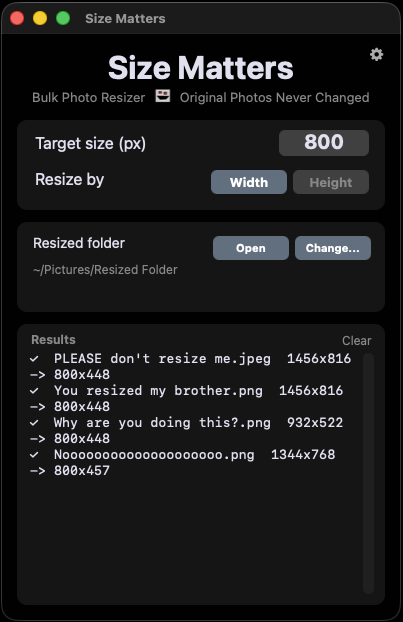
Size Matters is a tiny native macOS app that resizes a batch of photos in seconds. You drag your photos into the window and it makes smaller copies at the exact pixel size you choose. Your original photos are never touched or moved.
It is built for the exact problem of "I have huge photos and I need web-friendly versions." I was tired of opening each photo in an editor just to resize it. So I made a tool that lets you drop many photos into one window and they all come out resized. It keeps the aspect ratio automatically so nothing gets stretched. It remembers your folder, size, and settings next time you open it.
How It Works
- Open the app.
- Click the Change button in the Resized Folder section to pick the folder where the resized copies should be saved.
- Type the size you want (for example 1080) and choose Width or Height.
- Drag any photos into the window. Done. Resized copies appear in your folder.
- Click the Open button to jump straight to that folder in Finder.
Features
Drag and Drop Anywhere
Drop photos anywhere into the window to resize them. No menus to dig through, no files to open one at a time.
Batch Resize
Resize as many photos at once as you want. Drag a whole pile and they all come out the right size.
Width or Height
Resize by width or by height. The aspect ratio is kept automatically so nothing ever gets stretched or distorted.
Originals Stay Safe
Your originals are never changed or moved. The app only ever makes copies, so there is nothing to undo.
You Choose the Save Folder
Pick exactly where resized photos are saved. The app remembers your folder, size, and settings between launches.
Never Overwrites
Duplicate names become "photo (1).jpg" instead of replacing an existing file. You never lose work.
Private and Offline
Works fully offline. No account, no sign-up, no tracking. Free forever.
Supported Formats
Opens any common photo (JPG, PNG, TIFF, BMP, WebP, etc.). Saves in the same format as the original, or as a JPG for types macOS can't write.
macOS Installation (macOS 11 Big Sur or later)
Recent versions of macOS have strict Gatekeeper security that blocks apps downloaded outside the App Store. Size Matters is not App Store distributed, so you'll need one extra step to get it running and it only takes a few seconds.
- Open the downloaded Size Matters.dmg and drag Size Matters.app into your Applications folder.
- Open Terminal (search "Terminal" in Spotlight) and run this command, then press Enter:
xattr -cr "/Applications/Size Matters.app"
That command removes the quarantine flag macOS adds to downloaded apps. After running it, Size Matters will open normally every time. Universal app for Apple Silicon and Intel, about 2.7 MB.